
Sessions
A session is a named, ordered list of notes: one prompt in the making. You can have as many as you like; one is active, and new notes go into it.
The status bar always shows the active session and its note count:
FILES Search speedup (3 notes) src/matcher.rs 3:1 │ ? help q quit
Create a session #
Press Ctrl+N, type a name and press Enter. The new session becomes the active one. Pressing c when no session exists asks for a name the same way.
Switch sessions #
Press Shift+Tab to make the next session active, in any view; it wraps around after the last one, and a message shows which session you’re on. The gutter markers follow straight away.
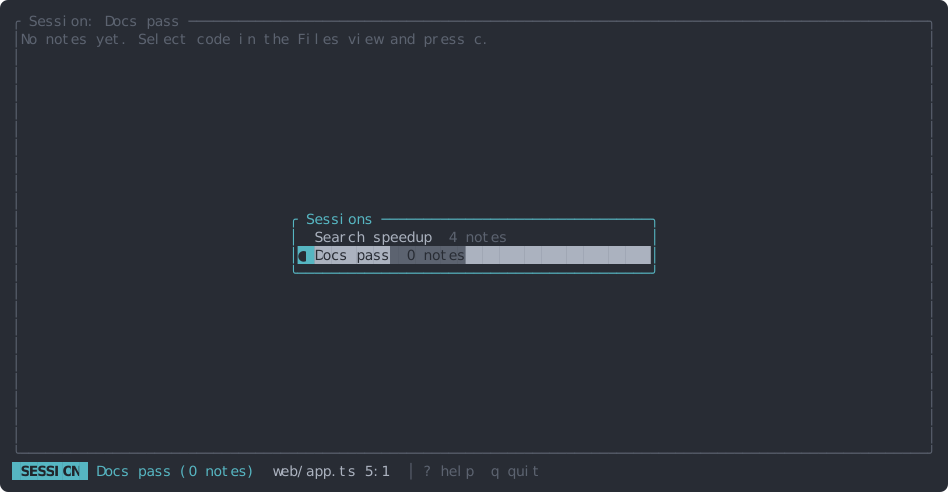
For a longer list, press Ctrl+O for the list of sessions with their note counts; ● marks the active one.
j / k move, Enter makes the session active and opens the Session view, Esc
closes the list.
The Session view #
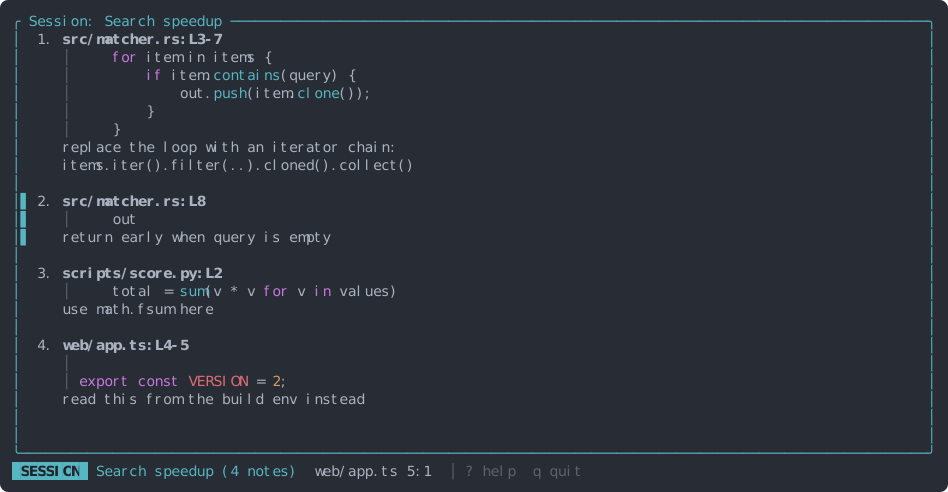
Press 3. Every note of the active session, in prompt order, with its location, up to six lines of its code and its instruction.
| Key | Action |
|---|---|
| j / k | Select the next / previous note |
| Enter | Jump to the note’s code in the Files view |
| e | Edit the note’s text (and Tab to move it) |
| d | Delete the note (asks first) |
| J / K | Move the note down / up: this is the order in the prompt |
| y | Copy the compiled prompt |
| r | Rename the session |
The locations show where each note is now: if its code moved, L88-95 follows it. Stale notes
show ⚠ stale.
Copy or export the prompt #
y copies the compiled prompt (see what the agent receives) and shows how many notes went in. Stale notes are skipped and mentioned in the message; an empty session copies nothing.
From the shell, without opening the app:
tackline export                   # the active session
tackline export "Search speedup"  # a session by name
tackline export | claude -p       # straight into Claude Code (other agents: see Workflow)
tackline sessions                 # list them; * marks the active one
Warnings (stale notes, an empty session) go to stderr, so piping stays clean.