
Getting started
Install #
One command, no Rust needed. Pick your platform:
curl --proto '=https' --tlsv1.2 -LsSf https://github.com/terminalkitten/tackline/releases/latest/download/tackline-installer.sh | sh
The script downloads the right binary for your machine (Apple Silicon or Intel, x86_64 or ARM64
Linux) into ~/.cargo/bin and adds that to your PATH. Open a new terminal afterwards.
brew tap terminalkitten/tackline https://github.com/terminalkitten/tackline
brew install terminalkitten/tackline/tackline
The tap is the tackline repository itself, so the first command is needed once. Update with
brew upgrade tackline.
In PowerShell:
powershell -ExecutionPolicy Bypass -c "irm https://github.com/terminalkitten/tackline/releases/latest/download/tackline-installer.ps1 | iex"
Use it in Windows Terminal. Open a new terminal afterwards so the PATH change applies.
Prefer to download by hand? Every release has archives for macOS (Apple Silicon, Intel), Linux (x86_64, ARM64) and Windows (x86_64) with checksums, on the releases page.
Any of these puts two commands on your PATH that do the same thing: tackline, and tack for
short. Every example in these docs works with either. To update, run the same command again (or
brew upgrade tackline).
If another program already installed a tack command, cargo stops and says so. Remove that one,
or keep using tackline.
First run #
Start it inside a git repository, from the root or any subdirectory:
cd ~/code/my-project
tackline
-
Pick a view. tackline opens on the Diff view when you have uncommitted changes, otherwise on the Files view. Switch any time with 1 (Files), 2 (Diff) and 3 (Session).
-
Answer the
.gitignorequestion. The first time, tackline asks whether to add.tackline/(where it keeps your sessions) to.gitignore. Press y to add it, or n; it won’t ask again either way. -
Open a file. Click it in the tree, or move with j and k and open folders and files with Enter. Tab moves between the tree and the code. Ctrl+P finds a file by name.
-
Select some code. Press V and move down with j to select whole lines, or hold Shift and use the arrow keys, or drag with the mouse.
-
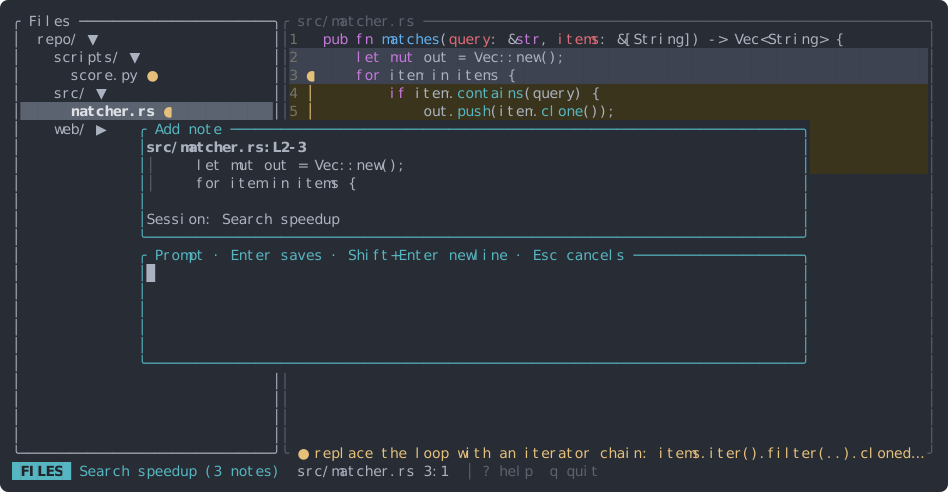
Write a note. Press c. Since there’s no session yet, tackline first asks for a session name. Then type the instruction and press Enter to save.
-
Copy the prompt. Press 3 for the Session view, check the notes, and press y. The compiled prompt is on your clipboard, ready to paste into your agent.
Everything is saved as you go: quit with q whenever you like.
Outside a git repository #
tackline also runs in a plain folder. The Files view, notes, sessions and search all work; only the Diff view needs git.
Next #
- Workflow with your agent: handing the prompt to Claude Code, Codex, opencode, aider, Cursor and others, and getting good results.
- Notes: everything you can do with a note.
- Keys: press ? in the app for the same list.