
Django Postbox
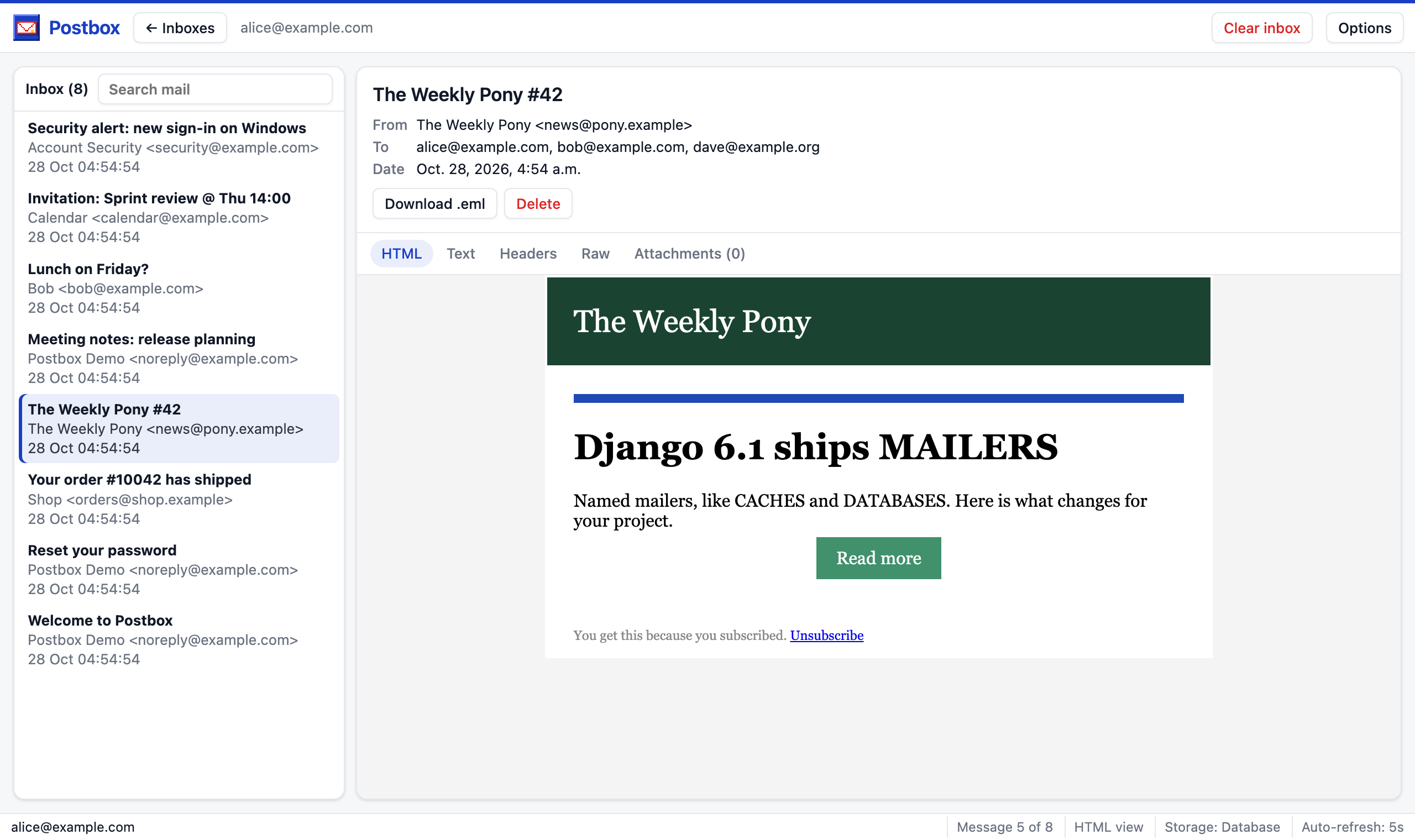
Your project sends mail: password resets, invites, order confirmations, weekly digests. While you build those, you want to see them the way your users will, without real mail leaving your laptop or a test server.
Django Postbox catches every mail your project sends and gives each recipient their own inbox. Open /dev/inbox/, click alice@example.com, and read exactly what Alice got: the HTML, the plain text, the headers and the attachments.
When it helps #
Change a template, send the mail again, and the inbox shows it within five seconds. No mail client, no SMTP server.
Sign up three users, invite two of them and reset a password. Every person gets their own inbox, so you see who received what, Cc and Bcc included.
Testers read their mail in the browser, and nothing reaches your real customers. See Capture and forward.
How it works #
- Your code sends mail the way it always does:
send_mail(),EmailMessage.send(), Django’s password reset, a third party app. - Postbox stores a copy per recipient. It is a regular Django email backend, so nothing in your code changes.
- Optionally, it passes the mail on to the next backend, for example the console or SMTP.
- You read it in the browser, in one of four themes, at the URL you choose.
Captured mail contains password reset links and other secrets. Keep the inbox for development, test and staging servers, and keep its URL behind a login: it is staff only by default.