Recipes
Start from the question you have. Each recipe is a complete insight you can paste into an insights.py, and change to your own models. They use Django’s own User and a small Order model:
class Order(models.Model):
    total = models.DecimalField(max_digits=8, decimal_places=2)
    quantity = models.IntegerField(default=1)
    status = models.CharField(max_length=20, default="paid")
    created_at = models.DateTimeField(auto_now_add=True)
    customer = models.ForeignKey(
        settings.AUTH_USER_MODEL, null=True, on_delete=models.SET_NULL
    )
Not sure which metric fits? See Metrics.
Growth #
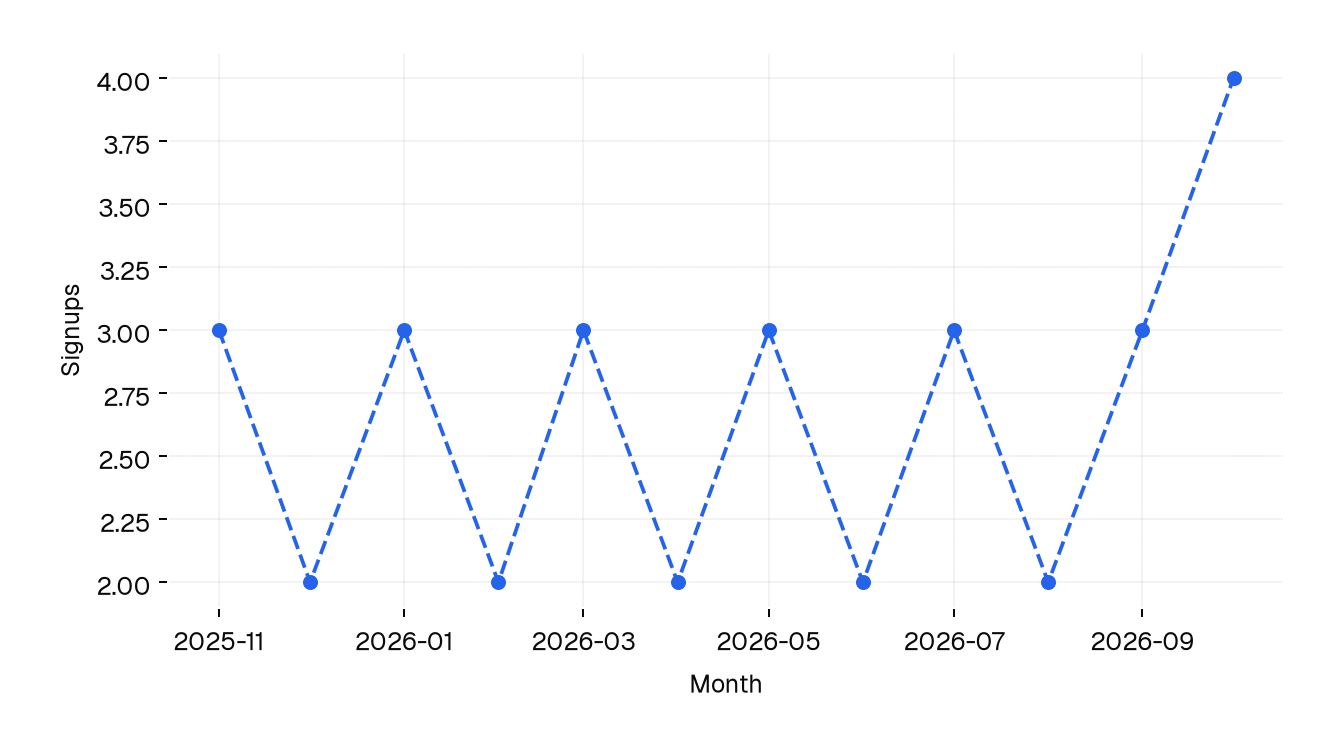
How many people sign up per month? #
A time series is the question “how many, per period”. Return (datetime, number) rows, oldest first:
from django.contrib.auth import get_user_model
from django.db.models import Count
from django.db.models.functions import TruncMonth

from django_insights.metrics import metrics
from django_insights.metrics_types import TimeSeriesResult

User = get_user_model()


@metrics.timeseries(
    question="How many people sign up per month?",
    xlabel="Month",
    xformat="%Y-%m",
    ylabel="Signups",
)
def signups_per_month() -> TimeSeriesResult:
    return (
        User.objects.annotate(month=TruncMonth("date_joined"))
        .values("month")
        .annotate(total=Count("pk"))
        .values_list("month", "total")
        .order_by("month")
    )
How many people were active lately? #
A counter is one whole number. The question decides the window, here the last 30 days:
from datetime import timedelta

from django.utils import timezone


@metrics.counter(question="How many people logged in the last 30 days?")
def active_users() -> int:
    since = timezone.now() - timedelta(days=30)
    return User.objects.filter(last_login__gte=since).count()
How many people never came back? #
A gauge is a decimal number, such as a percentage or an average:
@metrics.gauge(question="What percentage never logged in?")
def never_logged_in() -> float:
    total = User.objects.count()
    if not total:
        return 0.0
    return round(100 * User.objects.filter(last_login__isnull=True).count() / total, 1)
Guard against dividing by zero. An empty table on a new environment would otherwise make the insight fail, see When an insight fails.
Behavior #
On which weekday do people order? #
A bar chart shows a number per category. A weekday with no orders is missing from the query, so fill the gaps yourself to keep all seven bars:
from django.db.models.functions import ExtractWeekDay

from django_insights.metrics_types import BarChartResult
from shop.models import Order

WEEKDAYS = [
    (2, "Monday"),
    (3, "Tuesday"),
    (4, "Wednesday"),
    (5, "Thursday"),
    (6, "Friday"),
    (7, "Saturday"),
    (1, "Sunday"),
]


@metrics.barchart(
    question="On which weekday do people order?",
    xlabel="Weekday",
    ylabel="Orders",
)
def orders_per_weekday() -> BarChartResult:
    totals = dict(
        Order.objects.annotate(day=ExtractWeekDay("created_at"))
        .values("day")
        .annotate(total=Count("pk"))
        .values_list("day", "total")
    )
    return [(totals.get(day, 0), 0, name) for day, name in WEEKDAYS]
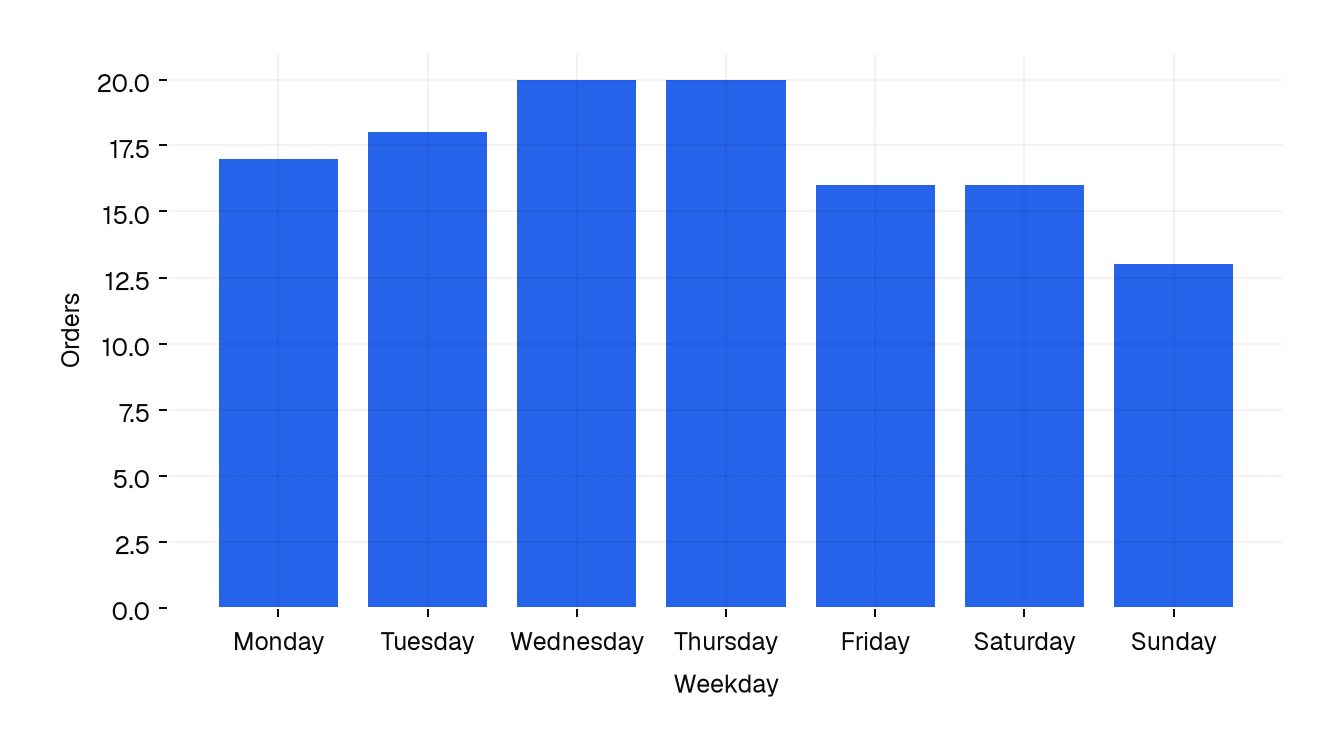
The rows of a bar chart are (height, unused, label), see What to return.
Do bigger orders contain more items? #
A scatter plot compares two numbers. Each row is (vertical, horizontal, category):
from django_insights.metrics_types import ScatterPlotResult


@metrics.scatterplot(
    question="Do bigger orders contain more items?",
    xlabel="Items",
    ylabel="Order total in USD",
)
def total_vs_items() -> ScatterPlotResult:
    return Order.objects.values_list("total", "quantity", "status")[:200]
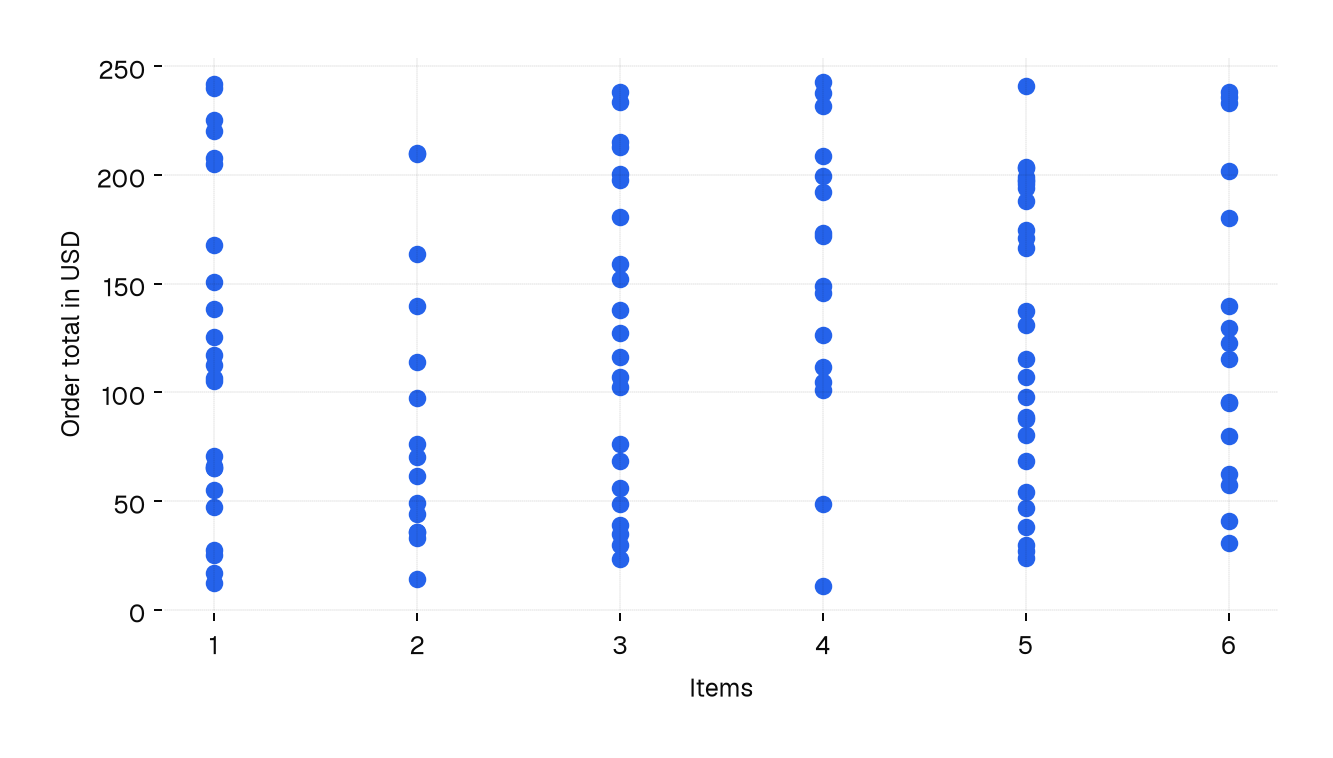
Cap the rows of a scatter plot: thousands of dots only make a blob.
Money #
Who are the top customers? #
A horizontal bar chart is a bar chart with room for long labels, ideal for a top 5 or top 10. Sort and slice in the query:
from django.db.models import F, Sum


@metrics.hbarchart(
    question="Who are the top 5 customers?",
    desc="Total spent per customer",
    xlabel="Customer",
    ylabel="Spent in USD",
)
def top_customers() -> BarChartResult:
    return (
        Order.objects.filter(customer__isnull=False)
        .values("customer__username")
        .annotate(spent=Sum("total"))
        .annotate(orders=F("spent"))
        .order_by("-spent")[:5]
        .values_list("spent", "orders", "customer__username")
    )
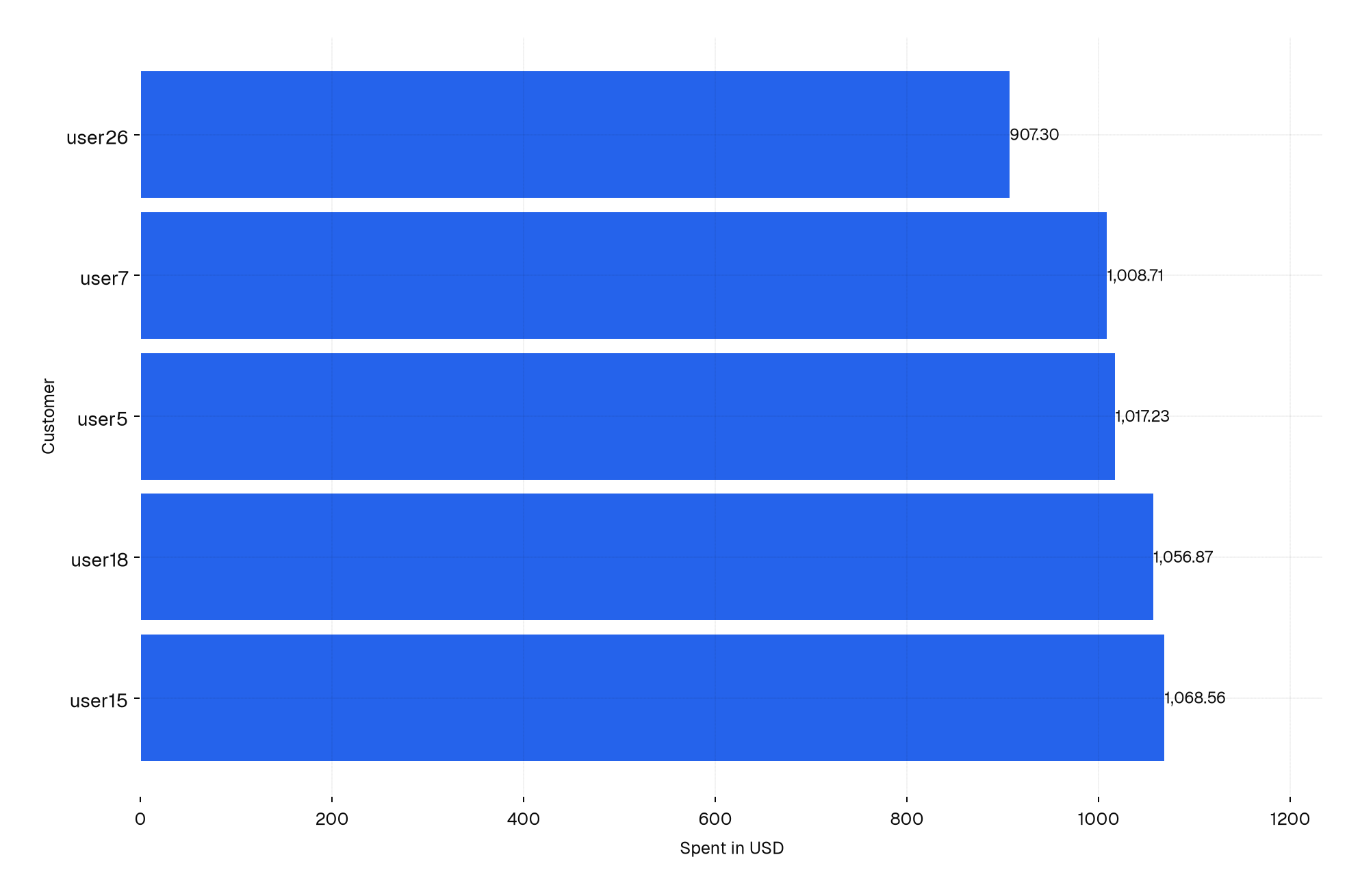
A label ends up in the insights database, and in the file you may share. Use a username or an id instead of an email address when the file leaves your team.
Is the refund rate going up? #
Give a counter or gauge a trend to show how it moved. The trend is a time series, the same rows a timeseries insight returns:
from django.db.models import Avg, Case, FloatField, When
from django.db.models.functions import TruncMonth


def refund_rate_per_month():
    return (
        Order.objects.annotate(month=TruncMonth("created_at"))
        .values("month")
        .annotate(
            rate=Avg(
                Case(
                    When(status="refunded", then=100.0),
                    default=0.0,
                    output_field=FloatField(),
                )
            )
        )
        .values_list("month", "rate")
        .order_by("month")
    )


@metrics.gauge(
    question="What percentage of the orders is refunded?",
    trend=refund_rate_per_month,
)
def refund_rate() -> float:
    return (
        Order.objects.aggregate(
            rate=Avg(
                Case(
                    When(status="refunded", then=100.0),
                    default=0.0,
                    output_field=FloatField(),
                )
            )
        )["rate"]
        or 0.0
    )
The dashboard shows the number with a small line, and the change of the last month against the one before it. See Trend.
Where to put them #
Each app can have its own insights.py, and a module-level label names the app in the dashboard. The recipes above can live in one reports app, or next to the models they query. Either way collect_insights finds them. Give every function in an app its own name: the name is the label of the insight.
Next #
- Show them: Dashboard.
- Keep them fresh: Collecting.
- Make sure they stay correct: Testing insights.